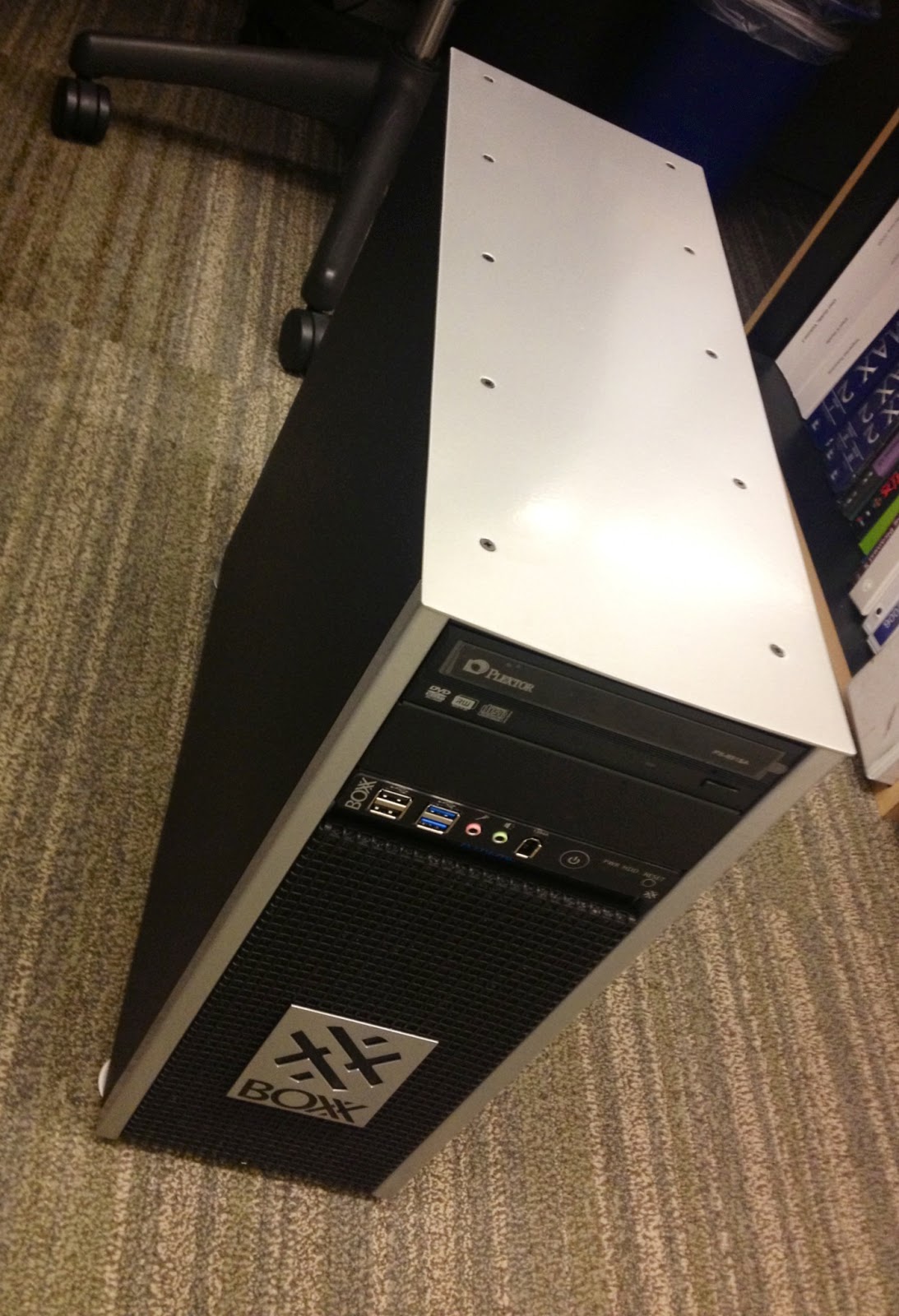
Earlier this month at Autodesk University, I had the opportunity to obtain the latest offering from BOXX - their new LEGO Workstation and Lego RenderPro. I could hardly wait to get these two systems built and benchmarked and share the results with everyone. Well, the results are in and these are the fastest systems with the most performance per dollar you can get in the LEGO world. I have to admit, I've never been able to assemble a LEGO kit as quickly as I did with these two. I hope you enjoy my review of these limited edition systems from BOXX and NO you can't have these - I've already gifted them to my kids!
In my testing, I found that I needed to miniaturize myself in order to get the full appreciation of the Workstation and RenderPro. Here you can see me basking in the full glory of the immense Workstation:
You'll note that just like other systems they offer, there are plenty of USB ports on the front - 4 for the Workstation and an extra on the RenderPro. Standard power on and HDD function LEDs on both units along with Power & Reset Buttons.
On the back of the Workstation, things get fun. A total of TEN Expansion slots, Dual Ethernet ports, another 4 USB ports and more that are too small to make out what they are... The RenderPro has Dual Ethernet ports and another 2 USB ports. You can see me eagerly applying the front face decal in this photo to the RenderPro.
Here you can see me taking a quick stroll across the top of the RenderPro after its been docked with the Workstation. Together they make a formidable foe that will render any LEGO scene faster than you can say Minecraft!
I also wanted to give everyone a sneak peak inside the Workstation to show you how cleanly assembled it is and easy to work on should you want to utilize those expansion bays. Despite the thick walls of the LEGO chassis, I found it incredibly easy to work on. You can clearly see they spared no expense on this liquid cooled, overclocked XEON CPU. Given that there are SIX stickers on the Workstation and FIVE on the RenderPro, that counts for an extra 55 Horsepower total above the overclocked 4.5GHz if you count 5HP per sticker. I have to say I was very impressed with these two systems and would like to thank BOXX Technologies for the opportunity get hands on time with these special systems.
Every other LEGO computer system you could buy is just a complete BRICK.
Sometimes a thing or two on yesterday, a little bit of today and some more of tomorrow...
Showing posts with label BOXX Technology. Show all posts
Wednesday, December 18, 2013
Monday, April 8, 2013
Benchmarking the 3DBOXX 4050 XTREME vs Dell T3600
Well, the numbers are in and I have to say that I'm very happy where they landed! In short, I would be looking at a 28% productivity boost to run the BOXX 4050 instead of the Dell T3600. In my previous post, I mentioned the specs between the Dell T3600 & the BOXX 4050 Xtreme. I've since updated that post slightly to more accurately reflect the T3600 specs that we use. Now for some numbers breakdown.
The Benchmark Tests
I have to give credit to RevitForum.org for their posting an updated version of the original AUbench Revit journals and updating the scripts to handle the new versions of Revit. You can download a copy of the same benchmark tool I used (If not a current member you'll need to signup, its free). This benchmark allowed great consistency and automated the majority of testing between systems and versions of Revit. I also ran this benchmark on a couple laptops we have and some of our older systems to get some historical context as time marches on. I also kind of wanted to see how the gap increased the father back we went on T3500 & T3400 models we have floating on the floor. Each machine and each version of Revit ran the benchmark tool 3 times to ensure I could get a fair average.
I also performed some manual tasks on both the T3600 & the 4050. It consisted of working with a Revit 2011 model that was 495MB in size. I took the model and timed the tasks of upgrading it from 2011 to 2012 and then to 2013. Other things were done and timed and noted. One thing to note was that the upgrade from 2012 to 2013 took a long time, much longer than I expected on both systems. Something to watch for as projects are upgraded.
Items of Note
In Conclusion
I know what you are thinking - "How do I convince management/purchasers/IT to switch to BOXX from their cherished status quo?" I've found that you can throw graphs and percentages and "everyone else is doing it" until you are blue in the face. What really gets them is cold hard cash. How much $$$$ will the company save if they use this new desktop that costs more than the status quo?
The steps taken in the benchmark tests represent things that would be done many times throughout the day, but for arguments sake, let’s say a person doesn't spend all their time using Revit. In fact, I’ll go out on a limb and say we can only apply the increase in speed over the T3600 once per day for an hour. Let’s run that number out over the course of a year and say the persons billable rate is $75/hour (just a guess for a position that involves heavy use of Revit).
$75/hour * 250 working days per year = $18750
This means that if the BOXX runs 28% faster than our T3600, we would save about $5250 per year on salary as we could get 28% more work done. We would save even more if the person was on an older system.
Even if the MSRP on the BOXX was roughly $3200, ROI is paid in less than a year!
Numbers & Graphs!
For simplicity, I'll list times & percentages first, followed with some graphs.
The Benchmark Tests
I have to give credit to RevitForum.org for their posting an updated version of the original AUbench Revit journals and updating the scripts to handle the new versions of Revit. You can download a copy of the same benchmark tool I used (If not a current member you'll need to signup, its free). This benchmark allowed great consistency and automated the majority of testing between systems and versions of Revit. I also ran this benchmark on a couple laptops we have and some of our older systems to get some historical context as time marches on. I also kind of wanted to see how the gap increased the father back we went on T3500 & T3400 models we have floating on the floor. Each machine and each version of Revit ran the benchmark tool 3 times to ensure I could get a fair average.
I also performed some manual tasks on both the T3600 & the 4050. It consisted of working with a Revit 2011 model that was 495MB in size. I took the model and timed the tasks of upgrading it from 2011 to 2012 and then to 2013. Other things were done and timed and noted. One thing to note was that the upgrade from 2012 to 2013 took a long time, much longer than I expected on both systems. Something to watch for as projects are upgraded.
Items of Note
- As each version of Revit progressed, things took slightly longer to complete, as shown in the total averages below.
- Many tasks I previously thought of as something being driven by the GPU are still handled by the CPU. For example, the benchmark measures time it takes the viewport to regenerate with Hardware Acceleration (HA) both on and off. However, between the 2 systems, the T3600 has a better video card than the 4050. So I expected the tests with HA on to run faster on the T3600 than on the 4050. However even with a lesser video card, the 4050 still outperformed the T3600!!! This proves that even though view regeneration should be handed off completely to the GPU, the CPU still processes much of the data. Therefore money spent on a faster CPU will go farther than a fancy GPU.
- My laptop I use that was purchased 2 years ago with a SSD primary HD, nice video card and 1.73GHz i7 CPU got spanked by a new, midrange laptop handed out to Project Managers in Model Creation and Rendering. However, it's on-board graphics card was no match for my Quadro 2800M, my laptop owned it in those tests. So, there is some credence to having some kind of a graphics card and not relying solely with an on-board GPU integrated into the motherboard. This confirms what I have felt over the time of using my laptop, the SSD doesn't offer as much of a boost in performance as I'd hoped. Put the money in the CPU!
In Conclusion
I know what you are thinking - "How do I convince management/purchasers/IT to switch to BOXX from their cherished status quo?" I've found that you can throw graphs and percentages and "everyone else is doing it" until you are blue in the face. What really gets them is cold hard cash. How much $$$$ will the company save if they use this new desktop that costs more than the status quo?
The steps taken in the benchmark tests represent things that would be done many times throughout the day, but for arguments sake, let’s say a person doesn't spend all their time using Revit. In fact, I’ll go out on a limb and say we can only apply the increase in speed over the T3600 once per day for an hour. Let’s run that number out over the course of a year and say the persons billable rate is $75/hour (just a guess for a position that involves heavy use of Revit).
$75/hour * 250 working days per year = $18750
This means that if the BOXX runs 28% faster than our T3600, we would save about $5250 per year on salary as we could get 28% more work done. We would save even more if the person was on an older system.
Even if the MSRP on the BOXX was roughly $3200, ROI is paid in less than a year!
So, the next time you are due for replacing a system that has become outdated or you are simply looking for the fastest system $$$$ can buy, I'd recommend you check out BOXX and their 4050 Xtreme!
Numbers & Graphs!
For simplicity, I'll list times & percentages first, followed with some graphs.
![]() |
| Hard numbers |
![]() |
| Pretty graphs |
Thursday, March 14, 2013
UnBOXXing the 3DBOXX 4050 XTREME
Today I was rather excited as I had a SMALL present delivered, courtesy of BOXX Technology. HMC is taking a look at their desktop system called 3DBOXX 4050 XTREME.
The system specs we currently use for Revit workstations are Dell T3600 with single socket, quad core hyperthreaded Xeon chips running @ 3.6GHz, 16GB RAM @ 1600MHz, nVidia Quadro 4000 graphics card and a 7200RPM 500GB hard drive with transfer rates @ 6GB/s.
The 3DBOXX 4050 XTREME specs are Single socket, quad core hyperthreaded i7 - water cooled & overclocked @ 4.75GHz, 16GB RAM @ 1600MHz, nVidia Quadro 600 graphics card and a 7200RPM 500GB hard drive with transfer rates @ 6GB/s (expanded spec sheet).
I plan to run some Revit Benchmark testing on it sometime over the next couple weeks and post back what the results are. I fully expect an unfair fight, but I am trying not to get too confident the 4050 will trounce the Dell. In the meantime, here are the unBOXXing photos I took. This has to be one of the cleanest packaging jobs I've seen in a while, both inside the cardboard as well as inside the 4050. Some of the guys didn't feel the design of the outside of the 4050 was elegant, but I've always been a function over form type of guy. For me, I like it - it looks rugged, no non-sense, no frills and what's under the hood is what counts.
The system specs we currently use for Revit workstations are Dell T3600 with single socket, quad core hyperthreaded Xeon chips running @ 3.6GHz, 16GB RAM @ 1600MHz, nVidia Quadro 4000 graphics card and a 7200RPM 500GB hard drive with transfer rates @ 6GB/s.
The 3DBOXX 4050 XTREME specs are Single socket, quad core hyperthreaded i7 - water cooled & overclocked @ 4.75GHz, 16GB RAM @ 1600MHz, nVidia Quadro 600 graphics card and a 7200RPM 500GB hard drive with transfer rates @ 6GB/s (expanded spec sheet).
I plan to run some Revit Benchmark testing on it sometime over the next couple weeks and post back what the results are. I fully expect an unfair fight, but I am trying not to get too confident the 4050 will trounce the Dell. In the meantime, here are the unBOXXing photos I took. This has to be one of the cleanest packaging jobs I've seen in a while, both inside the cardboard as well as inside the 4050. Some of the guys didn't feel the design of the outside of the 4050 was elegant, but I've always been a function over form type of guy. For me, I like it - it looks rugged, no non-sense, no frills and what's under the hood is what counts.
| The BOXX |
| Cleeeeean.... |
| Accessory boxx removed. |
| Accs. boxx - everything you need to expand the 4050, plus "the shirt". |
| The BOXX W4050XT sits in its unpackaged glory... |
| It's like a logo on a car almost... |
| Tons of ports, plenty of room to expand. |
| Sooo clean and simple - love it! HDD is on other side of panel behind motherboard. |
Subscribe to:
Posts (Atom)