Showing posts with label off topic. Show all posts
Showing posts with label off topic. Show all posts
Monday, November 18, 2013
Islands of the Pacific and Other Far Off Places
Mauritius, French Polynesia, New Caledonia - thanks for visiting! It's great to see such a diverse international audience that comes to visit this blog. It would be great to hear back from you with any efforts of BIM in your area. Feel free to drop a note in the comments or touch base with me via twitter or linked in.

Tuesday, December 4, 2012
Music in my World of BIM (or how iTunes 11 left me longing for 10) - Off Topic
If you are a human, chances are you love music. For me, music really helps me get stuff done - especially when faced with a looming deadline. So imagine my surprise when I upgraded to iTunes 11 yesterday and the interface completely changed on me. Actually, I should have expected it, but it left me staring at a barren landscape with seemingly no way to find my playlists I've painstakingly built. Thus began the great button hunt of 2012. Below I can sum up in about 3 steps totaling 7 clicks on how you can get iTunes 11 looking pretty much like iTunes 10 (please note this is on Windows7 64bit OS).
In iTunes 10 I was still using a list view of my music library (playlists & radio too). I don't need giant squares showing album covers. Give me a list view!
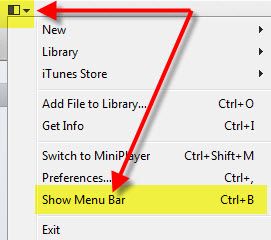
Step one:
Activate the Menu Bar

Step two:
Turn on Sidebar & Status bar via the View menu pulldown

Sidebar:

Status bar:

Step 3:
Click Music (or radio if looking for stations)

In iTunes 10 I was still using a list view of my music library (playlists & radio too). I don't need giant squares showing album covers. Give me a list view!
Step one:
Activate the Menu Bar
Step two:
Turn on Sidebar & Status bar via the View menu pulldown
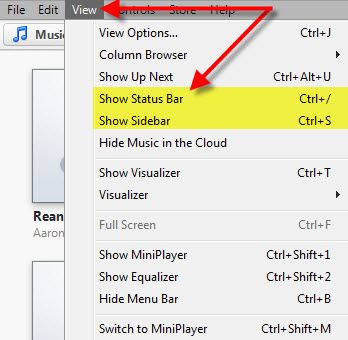
Sidebar:

Status bar:

Step 3:
Click Music (or radio if looking for stations)

Subscribe to:
Posts (Atom)